Introduction
Hi all, in this blogpost my goal is to reveal some obvious and known facts about using btree indexes in PostgreSQL.
In database world we almost all rely on btree indexes to improve range scan read performance. In other words, to improve query performance in OLTP databases. But using indexes is not free always and we as DBAs or software developers have to pay for it. I’ll try to discuss how can we achieve a sustainable indexing in PostgreSQL.
Before jumping into details I want to declare my idea about indexing. Sustainable indexing always improves database performance(at high level) and database operational excellence. Because in indexing the less is more in terms of operational excellence, maintenance, and performance for some workloads.
This blogpost contains some use-cases about sustainability and explains the differences by referring the PostgreSQL physical page layout, and nbtree algorithm. In addition to this, I’m going to display a few benchmark results using pgbench.
I’ll start with the question of why sustainable indexing matters in PostgreSQL by discussing the over-indexed tables and the cost of bloat&page split in physical files. Afterwards, cost of updating indexed columns and LP_DEADflag will be discussed.
In the second part of this blogpost, I’ll try to introduce some well-known proactive approaches to maximize the sustainable indexing experience in PostgreSQL.
Table of Contents
- Over-Indexed Tables and Sustainability
- Cost of Bloated B-Tree Indexes
- Cost of Page Splitting in B-Tree Indexes
- Cost of Updating Indexed Columns
- Unexpected Latencies Due to Heap Fetches in Secondary Instance
- Proactive Approaches to Maximize Sustainability
- Conclusion
Over-Indexed Tables and Sustainability
From my point of view sometimes we end up with over-indexed tables. What are the downsides of the over-indexed tables in our database ?
- Longer autovacuum and vacuum durations&increased index bloat.
- The less chance to benefit from HOT optimization while UPDATING rows.
- Reduced write performance (INSERT,UPDATE, and DELETE)
Let me explain the situation with a real world example. Imagine two identical tables and one of them contains only 2 indexes the other one contains 10 indexes. When we execute a simple DML benchmark on this two tables we can see the different easily because of the indexes. The table which is assumed over-indexed will have higher latency in DML queries.
The definition of schema as follow
CREATE TABLE IF NOT EXISTS table_2_indexes (
    id SERIAL PRIMARY KEY,
    uuid_col UUID DEFAULT gen_random_uuid(),
    varchar_col VARCHAR(100) NOT NULL,
    text_col TEXT,
    integer_col INTEGER NOT NULL,
    bigint_col BIGINT,
    decimal_col DECIMAL(10, 2),
    boolean_col BOOLEAN DEFAULT false,
    date_col DATE,
    timestamp_col TIMESTAMP DEFAULT CURRENT_TIMESTAMP,
    status VARCHAR(20) DEFAULT 'active',
    category VARCHAR(50),
    priority INTEGER,
    amount DECIMAL(15, 2),
    created_at TIMESTAMP DEFAULT CURRENT_TIMESTAMP,
    updated_at TIMESTAMP DEFAULT CURRENT_TIMESTAMP
);

-- Create 2 indexes on table_2_indexes
CREATE INDEX idx_table_2_indexes_uuid_col ON table_2_indexes(uuid_col);
CREATE INDEX idx_table_2_indexes_status ON table_2_indexes(status);

CREATE TABLE IF NOT EXISTS table_10_indexes (
    id SERIAL PRIMARY KEY,
    uuid_col UUID DEFAULT gen_random_uuid(),
    varchar_col VARCHAR(100) NOT NULL,
    text_col TEXT,
    integer_col INTEGER NOT NULL,
    bigint_col BIGINT,
    decimal_col DECIMAL(10, 2),
    boolean_col BOOLEAN DEFAULT false,
    date_col DATE,
    timestamp_col TIMESTAMP DEFAULT CURRENT_TIMESTAMP,
    status VARCHAR(20) DEFAULT 'active',
    category VARCHAR(50),
    priority INTEGER,
    amount DECIMAL(15, 2),
    created_at TIMESTAMP DEFAULT CURRENT_TIMESTAMP,
    updated_at TIMESTAMP DEFAULT CURRENT_TIMESTAMP
);

-- Create 10 indexes on table_10_indexes (on different columns)
CREATE INDEX idx_table_10_indexes_uuid_col ON table_10_indexes(uuid_col);
CREATE INDEX idx_table_10_indexes_varchar_col ON table_10_indexes(varchar_col);
CREATE INDEX idx_table_10_indexes_integer_col ON table_10_indexes(integer_col);
CREATE INDEX idx_table_10_indexes_bigint_col ON table_10_indexes(bigint_col);
CREATE INDEX idx_table_10_indexes_decimal_col ON table_10_indexes(decimal_col);
CREATE INDEX idx_table_10_indexes_date_col ON table_10_indexes(date_col);
CREATE INDEX idx_table_10_indexes_timestamp_col ON table_10_indexes(timestamp_col);
CREATE INDEX idx_table_10_indexes_status ON table_10_indexes(status);
CREATE INDEX idx_table_10_indexes_category ON table_10_indexes(category);
CREATE INDEX idx_table_10_indexes_priority ON table_10_indexes(priority);
After creating the preceding schema I execute two different benchmarks. Each file (big and small) contains:
- An INSERT statement
- An UPDATE statement
- A DELETE statement
-- Example benchmark script
-- INSERT
\set random_varchar random(1, 1000000)
\set random_integer random(1, 1000000)
INSERT INTO table_name (uuid_col, varchar_col, integer_col, status, created_at, updated_at)
VALUES (gen_random_uuid(), 'Record_' || :random_varchar, :random_integer, 'active', CURRENT_TIMESTAMP, CURRENT_TIMESTAMP);

-- UPDATE
\set random_id random(1, 1000000)
UPDATE table_name SET status = 'updated', updated_at = CURRENT_TIMESTAMP WHERE id = :random_id;

-- DELETE
\set random_id random(1, 1000000)
DELETE FROM table_name WHERE id = :random_id;
To sum up, I created an example schema containing two identical tables with different index count. Afterwards, created two different sql files to benchmark two table’s data ingestion performance.
After the DML benchmark I observed a difference in average latency between two tables though they’re identical in terms of definition. The only difference is the index count. As results reveal that the data ingestion performance is better for table with two indexes.
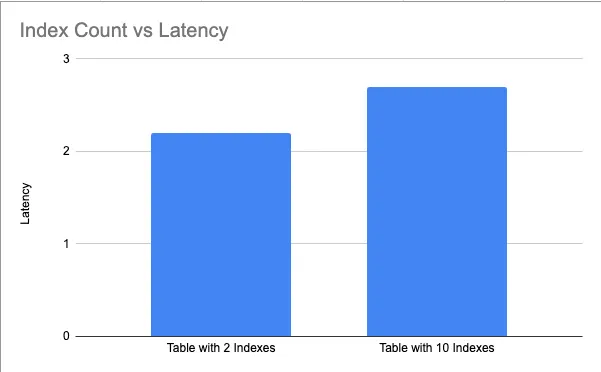
Performance comparison showing latency differences between tables with 2 indexes vs 10 indexes
TL;DR: The more B-tree indexes you have, the slower your write (DML) operations (INSERT, UPDATE, DELETE) will be. Excess indexes also increase bloat and reduce the chance of benefiting from HOT optimization. The benchmark showed the table with 10 indexes had higher latency than the identical table with 2 indexes
What reasons might be responsible for this increased latency ?
Cost of Bloated B-Tree Indexes
Considering sustainability without ignoring bloat and its potential impacts is almost impossible. Thereby, I want to discuss the well-known phenomena which is called index bloat . Before jumping into details about bloat it would be better to recall the btree physical page layout described in official PostgreSQL documentation.
The physical page layout of an index is identical to heap pages. In other words, indexes can be described as an array containing 8kB pages by default
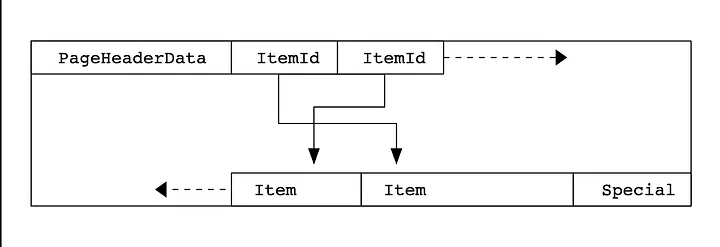
Visualization of the physical page layout of a B-tree index in PostgreSQL
We can touch the physical page information at PostgreSQL level by using pageinspect extension. Put simply, for example the following figure shows that how an index page looks like in PostgreSQL. You can see the items pointing to tuples in the heap. The items in the first page of the index are listed below. Each item has its own offset,data, and ctid information. The preceding physical index page illustration can be investigated at database.
SELECT * FROM bt_page_items(get_raw_page('idx_bloat_example_uuid_col', 1));

 itemoffset |    ctid    | itemlen | nulls | vars |                      data                       | dead |    htid    | tids
------------+------------+---------+-------+------+-------------------------------------------------+------+------------+------
          1 | (1392,1)   |      24 | f     | f    | 00 1b 72 26 72 9e 46 75 b1 fd c9 75 8b dd 5f 2b |      |            |
          2 | (1980,6)   |      24 | f     | f    | 00 00 0d 97 d2 fe 41 41 82 51 34 03 8b 4f c7 4e | f    | (1980,6)   |
          3 | (4805,1)   |      24 | f     | f    | 00 00 13 25 91 2f 44 11 b2 0b 8f 91 e1 87 22 91 | f    | (4805,1)   |
          4 | (9560,11)  |      24 | f     | f    | 00 00 2a 75 94 23 45 82 b7 57 f6 84 96 84 c1 27 | f    | (9560,11)  |
          5 | (1329,13)  |      24 | f     | f    | 00 00 46 1f 3b fb 40 ec 93 22 b6 15 6b 6b 0f 46 | f    | (1329,13)  |
          6 | (109,33)   |      24 | f     | f    | 00 00 5f 89 03 51 4e 8f 98 7b e0 e9 a8 de f5 a0 | f    | (109,33)   |
          7 | (13001,2)  |      24 | f     | f    | 00 00 61 66 a4 90 43 60 a5 51 88 fb 83 61 fc 0e | f    | (13001,2)  |
          8 | (3478,15)  |      24 | f     | f    | 00 00 72 63 fb 40 43 c5 96 17 b3 ce 6c c0 1a 25 | f    | (3478,15)  |
          9 | (11240,35) |      24 | f     | f    | 00 00 7c 9e 62 95 46 c1 b7 c7 c1 14 f0 4e 11 85 | f    | (11240,35) |
         10 | (13401,6)  |      24 | f     | f    | 00 00 88 5d e3 80 4f ab 9c 0c 6f a9 82 db 50 36 | f    | (13401,6)  |
         11 | (546,2)    |      24 | f     | f    | 00 00 92 ab 5b 61 43 1d a5 0b b2 0b c2 24 1f 7c | f    | (546,2)    |
         12 | (12942,27) |      24 | f     | f    | 00 00 f4 f3 4d 50 44 a0 83 68 7c 1e b4 48 61 d3 | f    | (12942,27) |
         13 | (12188,17) |      24 | f     | f    | 00 01 17 73 13 26 46 01 ad e8 72 27 b6 02 87 96 | f    | (12188,17) |
         14 | (12584,12) |      24 | f     | f    | 00 01 19 5d 38 94 47 64 89 8d 50 fb fa 80 9d 9c | f    | (12584,12) |
         15 | (11315,24) |      24 | f     | f    | 00 01 1c d7 08 fd 42 6f 89 bf cb 4e e4 58 ea 82 | f    | (11315,24) |
         16 | (4467,28)  |      24 | f     | f    | 00 01 21 bf 4b 5b 4f c3 90 db 3a e7 30 29 ea a8 | f    | (4467,28)  |
         17 | (10830,5)  |      24 | f     | f    | 00 01 31 dc d7 d2 4d ab 86 c4 4e a1 c4 ec c7 62 | f    | (10830,5)  |
         18 | (7959,16)  |      24 | f     | f    | 00 01 41 6d 54 bb 47 b1 a2 ec 2e 24 81 7a ab 8f | f    | (7959,16)  |
         19 | (7923,10)  |      24 | f     | f    | 00 01 47 8c 44 39 49 44 a4 5a 18 15 a1 66 ec c3 | f    | (7923,10)  |
         20 | (3720,15)  |      24 | f     | f    | 00 01 98 dd 70 b7 46 31 aa 93 f8 72 7e 2c 4d e2 | f    | (3720,15)  |
         21 | (3171,24)  |      24 | f     | f    | 00 01 c3 a7 9c 3a 4d 24 a6 f0 23 54 f4 19 1e f1 | f    | (3171,24)  |
         22 | (15407,13) |      24 | f     | f    | 00 01 cf 16 0d 61 47 55 97 b4 9b 18 68 59 d1 d0 | f    | (15407,13) |
         23 | (6828,13)  |      24 | f     | f    | 00 02 56 8c 43 a1 47 3a 9f a5 7c 9e b5 d7 11 c4 | f    | (6828,13)  |
         24 | (3606,18)  |      24 | f     | f    | 00 02 6e 99 66 4c 47 ae a2 0d a6 04 1d 43 79 08 | f    | (3606,18)  |
         25 | (7117,11)  |      24 | f     | f    | 00 02 71 b0 3f 21 40 32 a9 54 93 bb ae 19 7f 3c | f    | (7117,11)  |
         26 | (15058,14) |      24 | f     | f    | 00 02 87 d3 b3 38 46 2a a8 f6 12 7c 8a d6 dd b9 | f    | (15058,14) |
         27 | (2126,17)  |      24 | f     | f    | 00 02 96 32 66 a6 41 99 93 70 ca 80 99 f9 00 b9 | f    | (2126,17)  |
         28 | (4855,2)   |      24 | f     | f    | 00 02 b5 37 45 b2 4b 81 9c 5e 05 4d 5c 74 60 84 | f    | (4855,2)   |
         29 | (8756,7)   |      24 | f     | f    | 00 02 ea 53 84 1b 4b 59 a8 f3 e9 2d fc 8c 82 10 | f    | (8756,7)   |
         30 | (14987,21) |      24 | f     | f    | 00 02 ff 81 39 e1 45 55 9a 35 10 15 33 fa 66 49 | f    | (14987,21) |
         31 | (12216,30) |      24 | f     | f    | 00 03 04 05 d2 d5 44 fb b2 3e a4 d9 b3 58 23 8e | f    | (12216,30) |
         32 | (13791,18) |      24 | f     | f    | 00 03 1d 3a 92 2c 41 fc 93 74 bd 54 9e 69 e4 fa | f    | (13791,18) |
         33 | (2165,9)   |      24 | f     | f    | 00 03 2f 4d 70 e1 4d 5c 94 c5 59 0a 75 eb 2a da | f    | (2165,9)   |
         34 | (17006,7)  |      24 | f     | f    | 00 03 55 c8 23 52 4c 32 a3 e0 20 da dd 78 53 54 | f    | (17006,7)  |
         35 | (5415,23)  |      24 | f     | f    | 00 03 6c 72 12 57 47 53 9b d9 40 d5 b9 f9 c9 9d | f    | (5415,23)  |
         36 | (2417,8)   |      24 | f     | f    | 00 03 6d a8 11 2c 4d ca 90 f7 7d 05 d2 71 d3 24 | f    | (2417,8)   |
         37 | (3584,15)  |      24 | f     | f    | 00 03 94 63 ed 59 48 8c a0 48 e8 fc 03 e3 66 e3 | f    | (3584,15)  |
         38 | (8638,8)   |      24 | f     | f    | 00 03 94 df b1 28 46 48 99 45 36 16 16 72 d9 e3 | f    | (8638,8)   |
         39 | (13431,11) |      24 | f     | f    | 00 03 9c f7 14 cf 4f 9e 94 4c cc 53 a1 ac 58 c8 | f    | (13431,11) |
         40 | (10001,10) |      24 | f     | f    | 00 03 d8 1b 53 97 45 9b ae e2 1d 8e 82 02 26 7d | f    | (10001,10) |
         41 | (4820,27)  |      24 | f     | f    | 00 03 da ad 92 ab 40 c9 83 12 88 be 25 60 16 e6 | f    | (4820,27)  |
In addition to this, it’s possible to obtain the summary information of a page in the b-tree index file. For example, the 10th page of the index following index contains 0 dead items and 262 live items.
benchmark_v1=# SELECT * FROM bt_page_stats('idx_bloat_example_uuid_col', 10);
 blkno | type | live_items | dead_items | avg_item_size | page_size | free_size | btpo_prev | btpo_next | btpo_level | btpo_flags
-------+------+------------+------------+---------------+-----------+-----------+-----------+-----------+------------+------------
    10 | l    |        262 |          0 |            24 |      8192 |       812 |         9 |        11 |          0 |          1
(1 row)
Consider the second offset in the btree index file which is (1980,6). The first number indicates the physical 8KB data page (or block) within the table file where the row is stored and the second number is the offset/index of a line pointer within that page. This line pointer, in turn, points to the actual start of the row data inside the page.
SELECT * FROM bt_page_items(get_raw_page('idx_bloat_example_uuid_col', 1));

 itemoffset |    ctid    | itemlen | nulls | vars |                      data                       | dead |    htid    | tids
------------+------------+---------+-------+------+-------------------------------------------------+------+------------+------
          1 | (1392,1)   |      24 | f     | f    | 00 1b 72 26 72 9e 46 75 b1 fd c9 75 8b dd 5f 2b |      |            |
          2 | (1980,6)   |      24 | f     | f    | 00 00 0d 97 d2 fe 41 41 82 51 34 03 8b 4f c7 4e | f    | (1980,6)   |
When PostgreSQL updates a tuple in the heap it also has to update its index entries. But according to MVCC principles PostgreSQL marks the old index entry dead/unused.For example, pay attention to the following information.
The summary of index page statistics before the massive DML on the indexed column.
benchmark_v1=# SELECT * FROM pgstatindex('idx_bloat_example_uuid_col');
 version | tree_level | index_size | root_block_no | internal_pages | leaf_pages | empty_pages | deleted_pages | avg_leaf_density | leaf_fragmentation
---------+------------+------------+---------------+----------------+------------+-------------+---------------+------------------+--------------------
       4 |          2 |   18948096 |           209 |             13 |       2299 |           0 |             0 |            90.03 |                  0
(1 row)

benchmark_v1=# \di+ idx_bloat_example_uuid_col
                                                      List of relations
 Schema |            Name            | Type  |   Owner   |     Table     | Persistence | Access method | Size  | Description
--------+----------------------------+-------+-----------+---------------+-------------+---------------+-------+-------------
 public | idx_bloat_example_uuid_col | index | superuser | bloat_example | permanent   | btree         | 18 MB |
(1 row)
The summary of index page statistics after the massive DML on the indexed column.
benchmark_v1=# SELECT * FROM pgstatindex('idx_bloat_example_uuid_col');
 version | tree_level | index_size | root_block_no | internal_pages | leaf_pages | empty_pages | deleted_pages | avg_leaf_density | leaf_fragmentation
---------+------------+------------+---------------+----------------+------------+-------------+---------------+------------------+--------------------
       4 |          2 |   39092224 |           209 |             24 |       4747 |           0 |             0 |            43.81 |              49.78
(1 row)

benchmark_v1=# \di+ idx_bloat_example_uuid_col
                                                      List of relations
 Schema |            Name            | Type  |   Owner   |     Table     | Persistence | Access method | Size  | Description
--------+----------------------------+-------+-----------+---------------+-------------+---------------+-------+-------------
 public | idx_bloat_example_uuid_col | index | superuser | bloat_example | permanent   | btree         | 37 MB |
(1 row)
As figures reveal that the leaf_page count doubled and index mostly consist of leaf pages. We already covered that each page is 8192kB by default. To sum up, PostgreSQL had to add 2.448 more pages to our index file to commit our DML operations.
The space occupied by unused/dead entries in the index called bloat. In other words, the more frequent update/delete the more bloat space indexes occupy at filesystem.
When you update a column in the heap PostgreSQL simply adds a new index entry pointing the new TID of the data. After some time there might be too many index pages pointing to dead tuples in the heap.
With the light of preceding information we can describe the bloat as total space occupied by dead/unused items in the index page. In other words, it’s the result of UPDATE/DELETE operations inside the index pages. Until vacuum or reindex cleans up dead tuples the index lives with bloated pages.
Adding an index will push you to consider or deal with the bloat in the index pages and it’s not cheap. During data fetching PostgreSQL has to visit the heap to check visibility map because it doesn’t store VM information at the index and database need to check if the tuple is visible or not. This situation causes database to visit the heap more frequently.
The cost of bloated indexes
- Increased index size and database size.
- Longer autovacuums due to increased size.
- Impacted query plans/performance due to increased size.
- Consider the following indexes and observe the index size before and after the updates.

Figure: Index size growth due to DML-induced bloat
Because we updated the all records in the table the index sizes are doubled. This is totally expected.
TL;DR:If you add an index, remember that index bloat will increase its size, slow down VACUUM, and hurt query performance until it’s cleaned up by VACUUM or REINDEX.
Cost of Page Splitting in B-Tree Indexes
While discussing index sustainability we have to consider the cost of page splitting in b-tree indexes. Because page splitting requires more than 1 atomic WAL operations system crashes can cause indexes to miss downlinks during a page split.
The first and initial reason is page splitting. In B-tree index when the new record/tuple can not fit into the page it needs to be split. The split operation expensive operation and requires 2 atomic WAL operations. The WAL operation itself is expensive and to achieve the page split we have to write 2 atomic records to WAL.
Secondly, page splitting requires 2 phases of page locking because during concurrent writes PostgreSQL has to make sure no one will corrupt the new and old page. In other words, the split involves updating the old page (to add a downlink to the new page) and creating the new page (with the split keys and new downlinks). These two writes must be atomic relative to the page’s structure, but they require two separate WAL records because they modify two different physical pages.
If the system crashes after the first WAL record (modifying the old page) is written but before the second (modifying the new page) is complete, a crucial downlink could be missed. The recovery process handles this by ensuring both updates are correctly applied or rolled back, but it highlights the complexity and need for two-phase locking.
To avoid or reduce the cost of page splitting on indexes we can rely on fillfactor configurations. I’m not going to jump details about fillfactor but basically we can reduce it to help avoid or reduce the frequency of page splits in PostgreSQL B-tree indexes, thereby mitigating the associated costs. The fillfactor storage parameter specifies the percentage of space to leave on each index page for future insertions. By tuning fillfactor we can reduce the cost of page split.
To change the filfactor setting of a table you can use the following command example.
alter table table_name set (fillfactor=XXX);

Figure: Adjusting fillfactor reduces page splits and potential bloat in PostgreSQL indexes
As benchmark results imply that there is a difference in latency between two different filfactor configurations. Put simply, we can reduce the cost of page split by reducing the fillfactor but the main takeaways as follow
- The more indexes on the table the more page splits and more page splits cause more atomic WAL writes and locking. This will definitely increase the latency in DML operations.
- Reducing fillfactor can help to reduce cost of page split but it will increase the total index size.
When you read the source code you can see that the first WAL operation occurs at nbinsert.c
xlinfo = newitemonleft ? XLOG_BTREE_SPLIT_L : XLOG_BTREE_SPLIT_R;
recptr = XLogInsert(RM_BTREE_ID, xlinfo);
Afterwards, second atomic WAL write occurs for parent insertion (XLOG_BTREE_INSERT_UPPER)
/* Recursively insert into the parent */
_bt_insertonpg(rel, heaprel, NULL, pbuf, buf, stack->bts_parent,
new_item, MAXALIGN(IndexTupleSize(new_item)),
stack->bts_offset + 1, 0, isonly);

/* be tidy */
pfree(new_item);
In addition to this, in documentation inside the nbtree module it clearly explains the two atomic WAL writes.
An insertion that causes a page split is logged as a single WAL entry for the changes occurring on the insertion’s level — including update of the right sibling’s left-link — followed by a second WAL entry for the insertion on the parent level (which might itself be a page split, requiring an additional insertion above that, etc).
TL;DR: High latency from over-indexing is caused by B-tree page splitting. A split requires two separate atomic WAL writes and two phases of page locking, which adds significant overhead. You can reduce the frequency of splits by lowering the fillfactor, but this increases the index’s total disk size.
Cost of Updating Indexed Columns
After discussing over-indexed tables and the cost of page splitting we can continue with updating the indexed column to provide an unsustainable indexing experience. In other words, we can’t avoid updating the indexed columns but we can consider this and reduce the possibility when possible.
To show the impact I prepared two different queries using the same index but updates different columns. The idea is to reveal the impact of updating an indexed columns in PostgreSQL.
This benchmark measures the performance overhead of updating indexed columns versusnon-indexed columns. When updating an indexed column, PostgreSQL must maintain theindex by removing the old index entry and inserting a new one, which adds overheadcompared to updating a non-indexed column that only requires a table row update.The benchmark uses paired columns (indexed vs non-indexed) of the same data types(integer, varchar, timestamp, status) to provide a fair comparison across differentcolumn types. Results will show the transaction throughput difference, helping to quantify the cost of index maintenance during UPDATE operations.
CREATE TABLE IF NOT EXISTS update_benchmark_table (
    id SERIAL PRIMARY KEY,
    uuid_col UUID DEFAULT gen_random_uuid(),
    varchar_col VARCHAR(100) NOT NULL,
    text_col TEXT,
    integer_col INTEGER NOT NULL,
    bigint_col BIGINT,
    decimal_col DECIMAL(10, 2),
    boolean_col BOOLEAN DEFAULT false,
    date_col DATE,
    timestamp_col TIMESTAMP DEFAULT CURRENT_TIMESTAMP,
    status VARCHAR(20) DEFAULT 'active',
    category VARCHAR(50),
    priority INTEGER,
    amount DECIMAL(15, 2),
    created_at TIMESTAMP DEFAULT CURRENT_TIMESTAMP,
    updated_at TIMESTAMP DEFAULT CURRENT_TIMESTAMP,
    -- Columns specifically for indexed vs non-indexed comparison
    indexed_integer_col INTEGER,
    non_indexed_integer_col INTEGER,
    indexed_varchar_col VARCHAR(100),
    non_indexed_varchar_col VARCHAR(100),
    indexed_timestamp_col TIMESTAMP DEFAULT CURRENT_TIMESTAMP,
    non_indexed_timestamp_col TIMESTAMP DEFAULT CURRENT_TIMESTAMP,
    indexed_status_col VARCHAR(20) DEFAULT 'active',
    non_indexed_status_col VARCHAR(20) DEFAULT 'active'
);

-- Create indexes on specific columns for comparison
CREATE INDEX idx_update_benchmark_indexed_integer ON update_benchmark_table(indexed_integer_col);

-- Transaction 1: UPDATE indexed integer column
\set random_id random(1, 1000000)
\set random_integer random(1, 1000000)
UPDATE update_benchmark_table
SET indexed_integer_col = :random_integer,
    updated_at = CURRENT_TIMESTAMP
WHERE id = :random_id;

-- Transaction 2: UPDATE non-indexed integer column
\set random_id random(1, 1000000)
\set random_integer random(1, 1000000)
UPDATE update_benchmark_table
SET non_indexed_integer_col = :random_integer,
    updated_at = CURRENT_TIMESTAMP
WHERE id = :random_id;


postgres@5ff611480c63:~$ pgbench -c 50 -j 2 -T 120 -U superuser -f indexed-column-update.sql benchmark_v1
pgbench (17.6 (Debian 17.6-2.pgdg13+1))
starting vacuum...pgbench: error: ERROR:  relation "pgbench_branches" does not exist
pgbench: detail: (ignoring this error and continuing anyway)
pgbench: error: ERROR:  relation "pgbench_tellers" does not exist
pgbench: detail: (ignoring this error and continuing anyway)
pgbench: error: ERROR:  relation "pgbench_history" does not exist
pgbench: detail: (ignoring this error and continuing anyway)
end.
transaction type: indexed-column-update.sql
scaling factor: 1
query mode: simple
number of clients: 50
number of threads: 2
maximum number of tries: 1
duration: 120 s
number of transactions actually processed: 3150160
number of failed transactions: 0 (0.000%)
latency average = 1.903 ms
initial connection time = 117.481 ms
tps = 26271.576897 (without initial connection time)

postgres@5ff611480c63:~$ pgbench -c 50 -j 2 -T 120 -U superuser -f non-indexed-column-update.sql benchmark_v1
pgbench (17.6 (Debian 17.6-2.pgdg13+1))
starting vacuum...pgbench: error: ERROR:  relation "pgbench_branches" does not exist
pgbench: detail: (ignoring this error and continuing anyway)
pgbench: error: ERROR:  relation "pgbench_tellers" does not exist
pgbench: detail: (ignoring this error and continuing anyway)
pgbench: error: ERROR:  relation "pgbench_history" does not exist
pgbench: detail: (ignoring this error and continuing anyway)
end.
transaction type: non-indexed-column-update.sql
scaling factor: 1
query mode: simple
number of clients: 50
number of threads: 2
maximum number of tries: 1
duration: 120 s
number of transactions actually processed: 4668330
number of failed transactions: 0 (0.000%)
latency average = 1.285 ms
initial connection time = 24.612 ms
tps = 38904.659895 (without initial connection time)
After the benchmark there are basic take aways.
- Updating the indexed column(s) cause additional overhead because of cost of adding tuple to the index entries.
- Updating the indexed column(s) cause additional bloat/dead tuples in the index. Increased size in indexes might cause autovacuums/vacuums to take more time to finish.
- Columns chosen for indexing (e.g., category, sku, unique identifiers) should ideally be those whose values are immutable or change extremely infrequently.
- High-write columns should be unindexed to allow high-volume updates to proceed quickly with minimal overhead.
TL;DR: Updating a column that has an index is significantly slower than updating a non-indexed column because PostgreSQL must perform additional overhead to maintain (delete and insert new entries in) the index. To maintain performance, only index columns that are immutable or change infrequently
Unexpected Latencies Due to Heap Fetches in Secondary Instance
Another aspect of sustainable indexing is to consider index scans on secondary instances scanning more pages and visiting more frequently the heap. This situation can cause additional latency unexpectedly.
When a page split occurs in primary PostgreSQL has to lock new page and old page together because there might be more than 1 concurrent write requests at the same time. Concurrent writers can try to finish the same incomplete page split operation and cause corruption in indexes. But when it comes to hot standby there only writer is WAL replay and no need lock 2 pages.
In replica instance, all index scans are conservative regarding dead tuples (ignore_killed_tuples = false ). In other words, tuples with LP_DEAD bits set are also read by PostgreSQL in secondary instance since the oldest xmin in secondary can be older than primary and cause inconsistent results.
For example, the same query on primary can do less heap fetches than the secondary instance and performance cliffs can occurs. This is because secondary instance doesn’t rely on LP_DEAD flag and read all the pages.
TL;DR: On a secondary (hot standby/replica) instance, index scans are more conservative regarding dead tuples because the oldest transaction ID might be older than the primary. This can cause the secondary to visit the main table (heap fetches) and scan pages more frequently than the primary, resulting in unexpected performance cliffs
We’ve examined the key preventative actions and the pitfalls that lead to inefficient indexing. Now, the question is: what can we do about the indexes we already have? The next steps move beyond prevention to focus on active, continuous maintenance and repair to ensure peak efficiency in our existing databases.
Proactive Approaches to Maximize Sustainability
We already covered strategies and precautions to avoid from inefficient indexes in PostgreSQL but we can also focus on improving our existing indexes.
In PostgreSQL, we can rely on some maintenance operations on indexes to ensure maximum efficiency. The remaining part of this post will contain basic maintenance ideas/operations covering btree indexes.
Routine Reindexing (Concurrently)
One of the first and fundamental approach is to reindex your btree index if possible. Of course it’s a widely known topic in PostgreSQL and it’s straightforward to do it but there are some key points we have to consider before reindexing. Reindexing in PostgreSQL simply re-writes all btree pages with or without locking the object. Thereby, it’s important to decide which strategy to follow.
The benefits of reindexing in PostgreSQL
- Cleaning up the bloat and reduce the index size. Reduced index size leads to faster lookups and autovacuum process.
- Updating visibility map. Updated visibility maps provides more efficient index only scans in query plans.
- Ensuring the integrity of your data structure and the reliability of your query results. Put simply, fixing possible hidden corruptions
By proactively managing index bloat and maintaining a lean, robust index structure, developers and DBAs can ensure the long-term reliability, speed, and efficiency of their PostgreSQL-based systems.
Reindexing in PostgreSQL can be completed with two different approaches. It can be done concurrently or not. The difference is that when we use concurrently the reindex process becomes an online index creating.
benchmark_v1=# reindex index idx_concurrent_test_uuid;
REINDEX
Time: 788.564 ms
benchmark_v1=# reindex index concurrently idx_concurrent_test_uuid;
REINDEX
Time: 1411.854 ms (00:01.412)
When we use concurrently option it doesn’t cause exclusive lock (actually it acquires but in a different way).
- A new transient index definition is added to the catalog pg_index. This definition will be used to replace the old index.
- A SHARE UPDATE EXCLUSIVE lock at session level is taken on the indexes being reindexed as well as their associated tables to prevent any schema modification while processing.
- A first pass to build the index is done for each new index. Once the index is built, its flag pg_index.indisready is switched to “true” to make it ready for inserts, making it visible to other sessions once the transaction that performed the build is finished. This step is done in a separate transaction for each index.
- Then a second pass is performed to add tuples that were added while the first pass was running. This step is also done in a separate transaction for each index.
- All the constraints that refer to the index are changed to refer to the new index definition, and the names of the indexes are changed. At this point, pg_index.indisvalid is switched to “true” for the new index and to “false” for the old, and a cache invalidation is done causing all sessions that referenced the old index to be invalidated.
- The old indexes have pg_index.indisready switched to “false” to prevent any new tuple insertions, after waiting for running queries that might reference the old index to complete.
- The old indexes are dropped. The SHARE UPDATE EXCLUSIVE session locks for the indexes and the table are released.
Reading can be overwhelming for such sequential operations including technical details. Thereby, you can also visit the following diagram to visualise the idea behind concurrent reindexing.

Concurrent Reindexing Process in PostgreSQL. Visual representation of transactional phases and locking behavior during a REINDEX CONCURRENTLY operation.
Key Takeaways about Reindexing and Concurrently Reindexing
- Reindexing concurrently requires more time to completed compared the normal reindexing since it scans table two times.
- While reindexing concurrently if the operation fails it leaves an invalid index behind and we have to check this index because it causes UPDATE requests to wait for this invalid index as well.
- Like any long-running transaction, REINDEX on a table can affect which tuples can be removed by concurrent VACUUM on any other table.
Automating Sustainable Index Maintenance with pg-reindexer
While manual REINDEX CONCURRENTLY is fundamental, pg-reindexer is designed to solve the complexity and risk associated with production maintenance. It automates the difficult decisions of which indexes to rebuild (based on bloat/size) and how to execute the operation safely (concurrently and with minimal risk)
The tool simplifies index maintenance by focusing on safety, control, and intelligent decision-making:
- Bloat Detection: It uses PostgreSQL’s internal statistics to calculate the index bloat ratio. You can set a threshold (e.g., only reindex if bloat > 50%) to ensure resources are focused only on indexes that actually need maintenance.
- Granular Control: You can target reindexing at the schema-level or table-level, and filter by index type (e.g., only regular B-tree indexes or only primary keys/unique constraints).
- Exclusion Lists: Easily exclude specific indexes from the operation using a comma-separated list.
The tool performs critical checks to protect your production environment:
- Detects and skips reindexing when manual VACUUM operations are active.
- Checks for active synchronous replication to prevent primary database unresponsiveness.
- Automatically detects and offers to clean up orphaned _ccnew indexes left by interrupted concurrent reindex sessions.
I invite you to explore the capabilities of pg-reindexer, contribute to its development, and incorporate it into your own sustainable maintenance strategy. You can find more details in the official GitHub repository below
You can use the tool reindex your btree indexes or constraints in your database by using the following syntax.
pg-reindexer --schema $SCHEMA
--table orders \
--threads 1  \
--maintenance-work-mem-gb 1 \
--max-parallel-maintenance-workers 1 \
--skip-inactive-replication-slots \
--skip-sync-replication-connection \
--concurrently \
--index-type btree \
--log-file production_reindex.log\
The preceding command will reindex concurrently the btree indexes of orders table by setting the maintenance_work_mem, max_parallel_maintenance_workers with a single thread. If the tool encounters a sync replication or inactive replication slot it will not stop working it will continue.
In addition to this, we can increase threads to reindex more than 1 index concurrently. By using multiple threads (up to 32 configurable threads), pg-reindexer can rebuild multiple indexes simultaneously. This dramatically reduces the total time required to complete a full maintenance cycle, allowing you to fit comprehensive reindexing into smaller maintenance windows. pg-reindexer simply select indexes belonging to different tables once you increase the threads.
I can continue with some GUCs to manage reindex in terms of memory and cpu but the tool provides an abstraction and guideline about related GUCs.
Removing Redundant and Duplicate Indexes
The first approach for existing databases would be dropping the unused indexes to reduce the overhead and database size if possible. Because the less index leads to faster autovacuums. Moreover, they also improve your DML performance as we already revealed the benchmark results.
Removing duplicated indexes can be straightforward and the cheapest improvement you can buy in. Basically, two identical indexes in terms of column definition deemed duplicated. For example, the following table contains a duplicated index. You can remove test_1 or idx_concurrent_test_created_at because they’re identical and have impact on your vacuum&DML performance.
benchmark_v1=# \d+ concurrent_test_table
                                                                    Table "public.concurrent_test_table"
   Column    |            Type             | Collation | Nullable |                      Default                      | Storage  | Compression | Stats target | Description
-------------+-----------------------------+-----------+----------+---------------------------------------------------+----------+-------------+--------------+-------------
 id          | integer                     |           | not null | nextval('concurrent_test_table_id_seq'::regclass) | plain    |             |              |
 uuid_col    | uuid                        |           | not null |                                                   | plain    |             |              |
 varchar_col | character varying(255)      |           | not null |                                                   | extended |             |              |
 integer_col | integer                     |           | not null |                                                   | plain    |             |              |
 status      | character varying(50)       |           | not null |                                                   | extended |             |              |
 created_at  | timestamp without time zone |           | not null | CURRENT_TIMESTAMP                                 | plain    |             |              |
 updated_at  | timestamp without time zone |           | not null | CURRENT_TIMESTAMP                                 | plain    |             |              |
Indexes:
    "concurrent_test_table_pkey" PRIMARY KEY, btree (id)
    "idx_concurrent_test_created_at" btree (created_at)
    "idx_concurrent_test_integer" btree (integer_col)
    "idx_concurrent_test_status" btree (status)
    "idx_concurrent_test_uuid" btree (uuid_col)
    "test_1" btree (created_at)
To find the duplicated index on the database you can use the following query. It’s the most basic one and you can enhance if you want. It will give you the list of identical indexes with table and schema name.
SELECT
    n.nspname || '.' || t.relname AS TableName
    ,array_agg(n2.nspname || '.' || i.relname) AS Indexes
FROM pg_index p
JOIN pg_class t ON t.oid = p.indrelid
JOIN pg_namespace n ON n.oid = t.relnamespace
JOIN pg_class i ON i.oid = p.indexrelid
JOIN pg_namespace n2 ON n2.oid = i.relnamespace
GROUP BY
    p.indrelid
    ,t.relname
    ,n.nspname
    ,p.indkey
HAVING COUNT(*) > 1;
Redundant indexes are hard to define but it’s not that much hard. You have to consider your queries and indexes together to mark an index as redundant. It might be tricky to find or decide which index is redundant. Thereby we have to investigate tables, indexes, and queries as a whole.
An index on columns A is redundant if there is another index on columns A,B,C (or any set of columns where A is the first column). As following example reveals idx_1 is redundant.
CREATE INDEX idx_1 ON users (last_name);
CREATE INDEX idx_2 ON users (last_name, first_name);
Partial Indexing and Reducing the Footprint of Indexes
When we have to add index it’s always good idea to confirm if we can add a partial index. Because partial indexes occupies less space at the filesystem compared to non-partial competitors.
However, we have to analyse our queries for the table that we want to create partial indexes because PostgreSQL planner won’t use it if queries don’t use the filtered column. In PostgreSQL the partial index can be created via the example command.
-- Partial index: Only indexes rows where status = 'active'
-- This is more efficient when only a small percentage of rows are 'active'
CREATE INDEX idx_orders_partial_status_active
ON orders_partial(status)
WHERE status = 'active';
For example, if the application demands the active orders from the table solely you can rely on a partial index. The partial index preferred will be smaller than the non-partial btree index because it only stores the rows complying with the filter condition on definition.

Partial Indexing in PostgreSQL helps reduce storage and improve performance by indexing only rows that satisfy a filter condition.
As the preceding figure displays the difference in size it’s obvious that partial indexes are more efficient if they can be preferred. We can also compare the same query with different indexes. The first one relies on partial index and the second one relies on non-partial index.
The query relies on idx_orders_partial_status_active
benchmark_v1=# EXPLAIN (ANALYZE, BUFFERS, VERBOSE)
SELECT id, varchar_col, amount, created_at
FROM orders_partial
WHERE status = 'active';
                                                                       QUERY PLAN
--------------------------------------------------------------------------------------------------------------------------------------------------------
 Bitmap Heap Scan on public.orders_partial  (cost=4276.42..105866.46 rows=512000 width=38) (actual time=45.301..378.015 rows=501731 loops=1)
   Output: id, varchar_col, amount, created_at
   Recheck Cond: ((orders_partial.status)::text = 'active'::text)
   Rows Removed by Index Recheck: 2228091
   Heap Blocks: exact=33619 lossy=33026
   Buffers: shared read=67040
   ->  Bitmap Index Scan on idx_orders_partial_status_active  (cost=0.00..4148.42 rows=512000 width=0) (actual time=33.090..33.090 rows=501731 loops=1)
         Buffers: shared read=395
 Planning Time: 0.172 ms
 JIT:
   Functions: 4
   Options: Inlining false, Optimization false, Expressions true, Deforming true
   Timing: Generation 1.919 ms (Deform 0.826 ms), Inlining 0.000 ms, Optimization 1.017 ms, Emission 5.432 ms, Total 8.368 ms
 Execution Time: 393.471 ms
(14 rows)
The query relies on idx_orders_full_status
benchmark_v1=#
EXPLAIN (ANALYZE, BUFFERS, VERBOSE)
SELECT id, varchar_col, amount, created_at
FROM orders_full
WHERE status = 'active';
                                                                  QUERY PLAN
----------------------------------------------------------------------------------------------------------------------------------------------
 Bitmap Heap Scan on public.orders_full  (cost=5497.26..107035.46 rows=503333 width=38) (actual time=63.013..433.101 rows=499449 loops=1)
   Output: id, varchar_col, amount, created_at
   Recheck Cond: ((orders_full.status)::text = 'active'::text)
   Rows Removed by Index Recheck: 2229560
   Heap Blocks: exact=33623 lossy=33026
   Buffers: shared read=67042
   ->  Bitmap Index Scan on idx_orders_full_status  (cost=0.00..5371.43 rows=503333 width=0) (actual time=42.063..42.064 rows=499449 loops=1)
         Index Cond: ((orders_full.status)::text = 'active'::text)
         Buffers: shared read=393
 Planning:
   Buffers: shared hit=46 read=28
 Planning Time: 1.085 ms
 JIT:
   Functions: 4
   Options: Inlining false, Optimization false, Expressions true, Deforming true
   Timing: Generation 0.281 ms (Deform 0.172 ms), Inlining 0.000 ms, Optimization 0.243 ms, Emission 6.198 ms, Total 6.722 ms
 Execution Time: 469.597 ms
(17 rows)
I’m not going provide details but will emphasize a few takeaways about partial indexes.
- After analysing the queries and workload carefully we can definitely prefer partial indexes if there is a room for this.
- Partial indexes are smaller than the non-partial ones. This leads to reduction in autovacuum efforts because autovacuum has to deal with less pages.
- Partial indexes can improve our query performance. PostgreSQL partial indexes are a good option for saving space and improving query performance (by reducing autovacuum work and improving scan times) compared to full indexes, provided your queries specifically target the filtered column used in the partial index definition.
Conclusion
Maintaining peak PostgreSQL performance is a constant challenge and it’s rooted in several cumulative issues: the hidden overhead of over-indexed tables, the disruptive cost of B-tree page splitting, and the unexpected latency spikes caused by heap fetches, especially during recovery on secondary instances. There might be other cases I didn’t mention in this post. My intention was keeping the post simple and easy to read. I’ll continue with more details in the future.
Addressing these problems manually involves complex bloat calculation and risky lock management. By providing a safe, intelligent, and concurrent approach, the pg-reindexertool effectively transforms index maintenance from a high-risk, time-consuming chore into an automated, predictable process. It allows DBAs and developers to move beyond simply identifying index bloat and actively implement a sustainable, performance-driven maintenance strategy, ensuring their PostgreSQL databases remain fast, robust, and reliable for the long term.
It’s crucial to acknowledge that the benchmarks and observations presented here, while derived from extensive testing and reliance on PostgreSQL official documentation, represent a specific context and may not hold true for every database environment or workload. Indexing efficiency is highly dependent on factors like the data distribution, read/write ratio, hardware specifications, and specific query patterns of your application. Therefore, these suggestions should be treated as informed starting points, not universal truths. Before implementing any major changes to your indexing strategy, it is paramount that you consult the official PostgreSQL documentation and conduct thorough performance testing within your own production-like environment to validate any proposed changes.
Demir.
Originally published on Medium