Introduction
Have you ever thought about PostgreSQL connections — specifically, idle ones? If so, this blog post will offer a new perspective on how you manage them. I’ll be focusing on idle connections in the context of network failures, with the goal of helping you build a more robust and reliable PostgreSQL environment.
In the PostgreSQL world, we often concentrate on queries, indexes, and configuration tuning — but effective connection management is just as crucial. In particular, handling “zombie” connections (which we’ll define shortly) can lead to more efficient resource usage and a more stable database platform.
Zombie or idle connections can persist after a network failure or instance crash if the client and server fail to properly close them. This can result in more open connections than your application actually needs, increasing resource consumption unnecessarily.
We’ll explore TCP keepalives — what they are, why they matter, and what to consider before enabling them. The aim isn’t to provide fixed recommendations, but to encourage you to reflect on how your system handles connections and how small adjustments might improve the reliability of your PostgreSQL deployment.
Before diving into details and experiments, it’s important to outline the components and their versions, as behavior may vary depending on the database version, client, or operating system. For reference, I used the following setup:
- Database: PostgreSQL 17
- Client Application: Python 3.9.6
- Operating System: Debian GNU/Linux 12
Keep in mind that your results may differ if you’re using a different environment.
Table of Contents
- Describing Idle Connections
- PostgreSQL TCP Keepalive Configurations
- Configuration Example
- Considerations and Best Practices
- How to Change TCP Configurations
- TCP Configurations and Active Connections
- The Impact of Enabling TCP Keepalive Configurations
- Tips and Tricks to Work on Idle Connections and Configurations
- Conclusion
- References
Describing Idle Connections
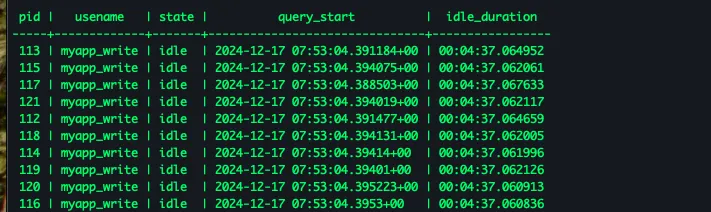
Before jumping into details about zombie connections and tcp keepalive configurations it might be better to revisit idle connections in PostgreSQL. I’ll try to keep it simple with basics. Basically, each connection has a state in PostgreSQL and we can query the state by running the following query. You can use the pg_stat_activity view to check the current connections and its state.
In this context we’ll first examine the idle connections. Basically, it refers to a connection currently waiting idle, in theory. Why don’t we just terminate it ? Well It consumes memory and other resources and if it is not working currently we can terminate it and tell the client if you need to do sth. on database just create a new connection.. A common explanation is that they’re just idle connections and not actually doing anything. However, this is incorrect—they’re consuming server resources.
PS: In this blogpost I’ll not consider the performance considerations of creating a new connection versus keeping the connection idle discussions. Because it’s strongly related with the nature of application and business together. The scope is limited with resource usage.
Visualization of idle connections in PostgreSQL
When it comes to reveal that idle connections have impact on resource usage we can check the following figure. After creating 250 idle connections the memory usage has been increased.

Memory usage increase after creating 250 idle connections
After the client closed OR database terminated idle connections memory usage has been decreased. It’s obvious that idle connections can consume resource and have an impact on overall PostgreSQL platform reliability.

Memory usage decrease after terminating idle connections
Before working on TCP keepalive configurations we ought to comprehend what issues/problems are we going to solve or which problems can we encounter now ? Could you image your application has been humming along smoothly, keeping a steady connection to your PostgreSQL database. But then, something goes wrong:
The network between the client and the database server suddenly becomes unreachable, or perhaps the client itself crashes unexpectedly.
While defining idle connections in PostgreSQL we have to contemplate the resource usage affect and robustness of the connections. How does PostgreSQL handles with the preceding problem, — the network becomes unavailable suddenly and comes back after X minutes. ?
When the network fails, the client might still think its connection is valid, but the truth is, it’s not. Left unchecked, the client may begin opening new connections without realising the old ones are essentially broken, potentially leading to resource strain and unexpected behavior.
To sum up, In PostgreSQL we tried to define idle connections, the impact on the resource usage, and their robustness in case of network disturbance. We’ll continue with ways to overcome invalid/zombie idle connections on database.
PostgreSQL TCP Keepalive Configurations
To prevent such scenarios, PostgreSQL provides TCP keepalive settings, which play a crucial role in managing idle connections and detecting network failures. By fine-tuning these configurations, you can ensure that stale or broken connections are identified and cleaned up in a timely manner, reducing the risk of resource exhaustion.
Here are the key parameters you should consider:
tcp_keepalives_idle: This defines the duration (in seconds) the server waits after the last data packet is sent before sending the first keepalive probe. A lower value means quicker detection of idle connections, but it could lead to unnecessary probes for long-running idle sessions.
tcp_keepalives_interval: Once the first probe is sent, this parameter determines the interval (in seconds) between successive keepalive probes if there’s no response. Shorter intervals can detect failures faster, but they increase network traffic.
tcp_keepalives_count: This sets the number of keepalive probes sent before considering the connection dead. Fewer probes result in faster cleanup of broken connections, but they might lead to premature disconnections during temporary network glitches.
Let me explain how these parameters will work in a real-world environment. An application has an open connection to the PostgreSQL server, but the network suddenly becomes unreachable due to a failure. Here’s what happens with these settings:
- At second 0: The client is idle, and no issues are detected.
- At second 10: The first keepalive probe is sent. No response is received due to the network failure.
- At second 20: The second keepalive probe is sent. Still, no response is received.
- At second 30: The third and final keepalive probe is sent. No response comes back.
- At second 40: After three failed probes, PostgreSQL declares the connection dead and cleans it up. The following logs will be written to the PostgreSQL log file once the invalid idle connections are terminated:
These log entries indicate that PostgreSQL has detected and terminated stale connections that were no longer valid due to network issues.
Configuration Example
To configure TCP keepalives in PostgreSQL, you can set these parameters in your postgresql.conf file or via ALTER SYSTEM:
-- Set TCP keepalive parameters
ALTER SYSTEM SET tcp_keepalives_idle = 600;      -- 10 minutes
ALTER SYSTEM SET tcp_keepalives_interval = 30;   -- 30 seconds
ALTER SYSTEM SET tcp_keepalives_count = 3;       -- 3 probes

-- Reload configuration
SELECT pg_reload_conf();
Alternatively, you can configure these settings in postgresql.conf:
tcp_keepalives_idle = 600
tcp_keepalives_interval = 30
tcp_keepalives_count = 3
Considerations and Best Practices
Before enabling TCP keepalives, consider the following:
- Network Environment: In stable network environments, aggressive keepalive settings might be unnecessary and could generate extra network traffic.
- Application Behavior: Applications that maintain long-lived connections for connection pooling may benefit from keepalives, while short-lived connections might not need them.
- Resource Trade-offs: More frequent keepalive probes detect failures faster but consume more network bandwidth and CPU resources.
- Default Behavior: By default, PostgreSQL uses the operating system’s TCP keepalive settings. Explicitly configuring these parameters gives you more control.
How to Change TCP Configurations
We tried to cover how TCP parameters behave and work regarding PostgreSQL idle connections and we can continue with how to update and manage them.
Changing TCP keepalive configurations can become tricky because PostgreSQL uses kernel configurations to mark a connection as dead if required. In other words, tcp keeaplives configurations can be managed at PostgreSQL or operating system level. In both ways, PostgreSQL benefits from it if configured properly. In this blogpost, I covered PostgreSQL level management practice of changing tcp keepalives parameters.
To update TCP keepalive configurations we can execute the following commands.
ALTER SYSTEM SET tcp_keepalives_idle TO 10;
ALTER SYSTEM SET tcp_keepalives_interval TO 10;
ALTER SYSTEM SET tcp_keepalives_count TO 3;
SELECT pg_reload_conf();
A value of 0 (the default) selects the operating system’s default.
PS: There are different ways to manage and update the PostgreSQL configurations. I tried to use one of the basic ones to illustrate the change. Afterwards, it’s possible to validate the new configurations applied. We can check the
pg_settingsview in PostgreSQL.
SELECT * FROM pg_settings
WHERE name IN ('tcp_keepalives_interval', 'tcp_keepalives_idle', 'tcp_keepalives_count');
When it comes to finding the best values to set TCP keepalives parameters there is no single magic value. Because it depends on your application, business, and network infrastucture together. You have to think about the best values for your environment.
TCP Configurations and Active Connections
We updated the tcp keepalive configurations but what about the other connections? In other words, we’ve discussed idle connections what about the active ones. In this scope if the connection becomes zombie while it’s in active state TCP keepalive parameters doesn’t mark active connections dead/broken. As a result, they are not going to be terminated.
Active connections are going to be closed after the current query completes and once PostgreSQL instance tries to send result to client. Because client is not available anymore for PostgreSQL it will close connection(s). Until it reaches to sending data to client phase the connection remains and use resource.
2024-12-20 09:23:32 2024-12-20 08:23:32.673 UTC [620] STATEMENT:  SELECT * from pgbench_accounts;
2024-12-20 09:23:32 2024-12-20 08:23:32.673 UTC [619] LOG:  could not send data to client: Connection reset by peer
There are other ways to terminate invalid/zombie active connections as well but in this blogpost we’re not going to solve this problem. Keep in mind that this blogpost covers managing zombie idle connections in PostgreSQL.
The Impact of Enabling TCP Keepalive Configurations
Enabling TCP parameters may introduce positive and negative impacts on database platform. These consequences also effects client and application together.
Possible Advantages of Enabling TCP Keepalives
Optimised Resource Usage and More Sustainable Connection Capacity Management
Because each connection consumes memory and CPU in the instance unused/orphan connection can cause unnecessary resource consumption even causing PostgreSQL service to be unresponsive. In addition to this, unused connection can cause PostgreSQL to hit the maximum connection capacity which may introduce additional downtime for business.
Reduce the Recovery Time in Network Failures
It’s not the recovery concept which comes to our mind first, — recovering WAL files after crash. It’s about becoming reachable again and healthy connections between database and client again.
Possible Disadvantages of Enabling TCP Keepalives
While working on database platforms almost no change is cheap and free. Enabling TCP keepalive configurations lead to possible different issues.
CPU Overhead in Large-Scale Environments
The OS checks every open socket periodically for keepalive activity. On a system with thousands of connections, this adds a small amount of CPU load, especially on older kernels or busy servers.
Increased Network Chatter
Keepalive probes send periodic packets even if the client is idle. Minimal in low- to medium-connection systems, but on systems with thousands of idle connections, this can add up to measurable network noise.
After highlighting some basic advantages and disadvantages of TCP keepalive parameters we can conlclude this blogpost with possible considerations before enabling them. To sum up,
Considerations Before Enabling It on PostgreSQL Level
Conflicts With Connection Poolers or Middleware
Tools like PgBouncer or HAProxy y may have their own connection health-check logic. Conflicting timeout and keepalive behavior can cause unexpected disconnections or reconnections. Thereby, it’s strongly suggested to consider all components together.
Aggressive Timeouts Can Cause Premature Connection Drops
When your network is temporarily slow, PostgreSQL might think the client is dead and valid connections may be dropped unnecessarily, breaking apps or batch jobs.
After highlighting some basic advantages and disadvantages of TCP keepalive parameters, we can conclude this blog post with possible considerations before enabling them.
To sum up, enabling TCP keepalives in PostgreSQL can help detect dead connections early, reduce resource leaks from idle or broken sessions, and improve overall connection stability. However, overly aggressive settings can lead to unnecessary connection drops or minor overhead in systems with many idle sessions.
Before enabling or tuning TCP keepalive parameters, consider the following:
- Understand your network topology and idle timeout behavior (e.g., firewall, proxy, or load balancer timeouts).
- Avoid too aggressive values unless you’re certain they’re required by infrastructure.
- Monitor connection behavior after changes — check for unexpected disconnects or increases in dropped connections.
- If you’re running a large PostgreSQL instance with thousands of connections, evaluate the CPU/network impact, and consider using a connection pooler like PgBouncer to reduce the idle connection footprint.
Thoughtful configuration of TCP keepalive parameters can improve robustness without introducing bottlenecks — just make sure they’re tuned with your environment in mind.
Tips and Tricks to Work on Idle Connections and Configurations
I can share some basic scripts and tips to review the current connections on the platform. It’s also possible for you to use your own script but I wanted to share some basic tips too. The following queries are not secret or complicated ones but they can help.
Query 1: Check Idle Connections
You can refer the following query to gain an overview of the current idle connections.
SELECT
    pid,
    usename,
    datname,
    state,
    query_start,
    now() - query_start AS idle_duration
FROM
    pg_stat_activity
WHERE
    state = 'idle';
Query 2: Check TCP Settings
Another short query is for checking current TCP settings on the PostgreSQL.
SELECT
    name,
    setting,
    vartype
FROM
    pg_settings
WHERE
    name IN (
        'tcp_keepalives_interval',
        'tcp_keepalives_idle',
        'tcp_keepalives_count'
    );
Conclusion
TCP keepalives are a valuable tool for managing idle connections in PostgreSQL, especially in environments where network reliability is a concern. By understanding how these parameters work and configuring them appropriately for your environment, you can improve the reliability and resource efficiency of your PostgreSQL deployment.
Remember that the optimal settings depend on your specific network conditions, application behavior, and reliability requirements. Start with conservative values and adjust based on your monitoring and observations.
The goal is to strike a balance between quickly detecting broken connections and avoiding unnecessary network overhead. With proper configuration, TCP keepalives can help you maintain a more robust and reliable PostgreSQL environment.
Demir.